
In summary:
- Transform from a passive patient to an active “health co-pilot” to take control of your brief appointment time.
- Create a dedicated “telehealth station” with proper lighting and technology to prevent misdiagnosis and technical issues.
- Prepare a one-page health dashboard with data patterns, not just a list of symptoms, to guide the conversation effectively.
- Understand which symptoms require physical touch and when to insist on an in-person visit for your safety.
- Unify communication between yourself, your caregivers, and your provider to prevent dangerous medication errors.
The chime rings, the video connects, and the 15-minute timer starts. For many seniors using an iPad for doctor visits, this experience feels less like a consultation and more like a race against the clock. You have questions, but the conversation moves so fast you feel rushed, and you hang up wondering if you were truly heard. The common advice is to “make a list” or “find a quiet place,” but this passive preparation often isn’t enough to change the dynamic of the call.
These tips, while well-intentioned, fail to address the core issue: a feeling of powerlessness in a compressed, digital environment. When a doctor can’t use physical touch and relies solely on what they can see and hear through a screen, the responsibility for clear, accurate information shifts significantly to you, the patient. This challenge is compounded by technical glitches, poor lighting that can obscure symptoms, and fragmented communication between different specialists.
But what if the key wasn’t just to prepare, but to take command? This guide reframes the approach to telehealth. Instead of being a passive passenger, you will learn to become the co-pilot of your own healthcare narrative. It’s about actively structuring the appointment yourself, creating a diagnostic-friendly environment, and using data to tell a compelling story about your health. This shift in mindset ensures you are not just seen, but understood, and that every precious minute is used to its fullest potential.
This article will provide an actionable blueprint for transforming your telehealth experience. We will cover everything from setting up your physical space for diagnostic accuracy to building an integrated care plan that keeps everyone on the same page, empowering you to navigate your next virtual visit with confidence and clarity.
Summary: How to Maximize a 15-Minute Telehealth Visit With a New Provider?
- Why Poor Lighting Can Lead to Misdiagnosis in Dermatology Telehealth?
- How to Set Up a “Telehealth Station” for Clear Communication?
- Wi-Fi Drops vs. Platform Glitches: What to Do When the Call Freezes?
- The Mistake of Conducting Telehealth Calls in the Living Room
- When to Reject Telehealth: 3 Symptoms That Require Physical Touch
- Why Continuous Tracking Beats Sporadic Doctor Visits for Heart Health?
- Why Fragmented Communication Causes Medication Errors in 40% of Cases?
- Building Integrated Care Plans That Unify Doctors and Family Caregivers
Why Poor Lighting Can Lead to Misdiagnosis in Dermatology Telehealth?
In a physical clinic, a dermatologist uses specialized tools and controlled lighting to examine your skin. In a telehealth visit, your provider can only see what your camera shows them, and poor lighting can create a diagnostic disaster. Shadows can mimic or hide lesions, while the wrong color of light can mask the subtle red tones of inflammation (erythema) or the yellowing of jaundice. This isn’t a minor issue; it directly impacts diagnostic accuracy. However, when done correctly, the potential is huge. In fact, recent research demonstrates a 91% accuracy rate for remote dermoscopy diagnosis, highlighting that the technology works, but only in the right conditions.
To create a truly diagnostic environment, you must become your own lighting technician. The goal is to provide your doctor with a view that is as clear and true-to-life as possible. The single most effective light source is natural daylight. Position yourself so you are facing a window, allowing bright, indirect sunlight to illuminate the area of concern evenly. This prevents the harsh shadows and color distortion common with indoor lighting.
If natural light isn’t an option, you must replicate its effects. Avoid using a single overhead light, which casts deep shadows. Instead, use two light sources (like desk lamps) placed at 45-degree angles to your face or the skin area. This “cross-lighting” technique cancels out shadows. Furthermore, the type of bulb matters. Avoid fluorescent or cheap LED bulbs with a low Color Rendering Index (CRI), as they can make your skin look unnaturally pale or yellow. For maximum accuracy, hold a plain white sheet of paper near your skin just before the call begins; this helps the camera on your iPad or computer to auto-adjust its white balance, ensuring the colors your doctor sees are as realistic as possible.
How to Set Up a “Telehealth Station” for Clear Communication?
Your environment is more than just a backdrop; it’s an active participant in your telehealth call. A cluttered or poorly arranged space divides your attention and can hinder communication. To maximize efficiency, you must create a dedicated “telehealth station.” This isn’t just about finding a quiet corner; it’s a strategic setup designed for clarity, focus, and accessibility. The impact is significant, with reports showing that seniors who create these stations report 40% higher satisfaction rates with their virtual visits. The key is having everything you need within arm’s reach to avoid fumbling or leaving the screen during your limited 15 minutes.
This station should be built around ergonomic principles to ensure comfort and a clear line of sight. Place your iPad or laptop on a stack of books or a stand so the camera is at eye level. This is more professional and helps the doctor connect with you, but more importantly, it prevents neck strain. An ergonomic chair with good lumbar support allows you to focus on the conversation, not on your discomfort. Below is an example of a well-organized telehealth station that prioritizes both comfort and function.
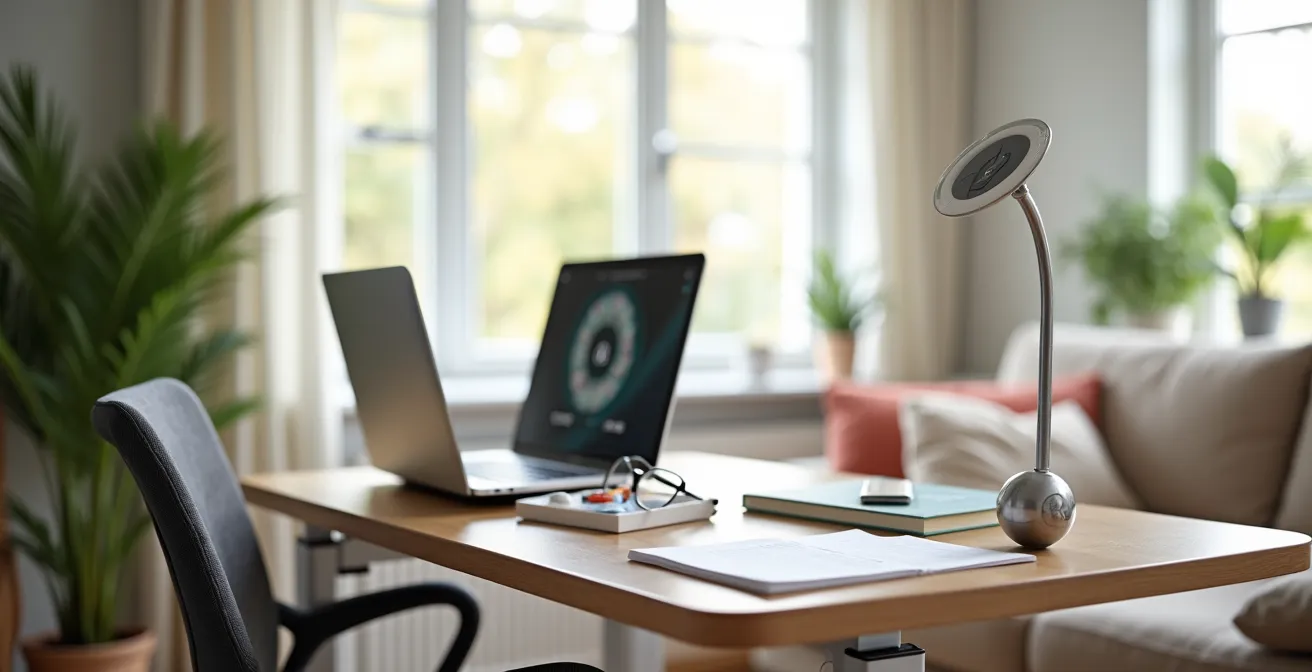
As the image illustrates, your station should also include critical health items. Have your medication bottles (including over-the-counter drugs and supplements), your one-page health dashboard, a notepad, and a pen laid out neatly. If you have hearing challenges, using a headset with a boom microphone can dramatically improve audio clarity for both you and your provider. Finally, prepare a one-sentence opener that immediately focuses the appointment, such as, “Hello Dr. Smith, I’d like to discuss the high blood pressure readings I’ve been tracking since Tuesday.” This transforms you into a health co-pilot from the very first second.
Wi-Fi Drops vs. Platform Glitches: What to Do When the Call Freezes?
Nothing creates more anxiety during a telehealth visit than a frozen screen. Panic sets in, and precious minutes are lost. The key to handling these interruptions is to have a pre-planned “communication triage” protocol. First, you must quickly diagnose the problem. If your own video in the corner of the screen is still moving but the doctor is frozen, the problem is likely on their end. In this case, the best action is to wait patiently for 30 seconds, as their system may self-correct. If everything on your screen is frozen, the issue is likely your own Wi-Fi connection, and you need to be prepared to act.
Many people worry that video calls will overwhelm their internet plan, but this is often a misconception. Video calls use less than 50% of the data required for streaming a high-definition movie, so a standard internet connection is usually sufficient. The problem is more often connection *stability* than speed. To minimize risk, position yourself as close to your Wi-Fi router as possible, and ask others in the house to avoid heavy internet activities like streaming or gaming during your 15-minute appointment.
If the screen remains frozen after 30 seconds, it’s time to execute your plan. Disconnect from the call and immediately try to rejoin using the same link. If you cannot get back in, do not panic. This is why you must, before every appointment, confirm a backup plan with the clinic’s staff. Have their direct phone number written down at your telehealth station. If you can’t reconnect to the video call within a minute, call them directly to either complete the visit by phone or reschedule. Having this plan removes the uncertainty and keeps you in control, even when technology fails.
The Mistake of Conducting Telehealth Calls in the Living Room
The living room or kitchen might seem like the most convenient places for a telehealth call, but they are often the worst choices for an effective medical consultation. These common areas are filled with distractions—a ringing phone, a family member walking by, a television in the background—that divide your attention and inhibit open communication. More importantly, a lack of privacy can prevent you from discussing sensitive health information. If you’re worried someone might overhear, you are less likely to be completely candid, which can lead to an incomplete diagnosis.
This is not just a matter of comfort; it’s a matter of clinical effectiveness. Analysis from healthcare providers has found that patients who use a private, dedicated space for their telehealth visits are 3 times more likely to disclose sensitive health information completely. The visual clutter and potential for interruptions in shared spaces detract from the patient’s ability to focus, which also affects their recall of the doctor’s advice after the call is over. Your 15-minute appointment is too valuable to be compromised by a distracting environment. The U.S. Department of Health and Human Services offers clear and simple guidance on this:
Choose a quiet place with good access to the internet. Make sure you are comfortable and can talk openly.
– U.S. Department of Health and Human Services, Telehealth.HHS.gov Patient Guidelines
Choosing a bedroom, a home office, or any room where you can close the door sends a clear signal to both yourself and your provider that this conversation is confidential and deserves full attention. It allows you to build the “appointment narrative” without fear of judgment or interruption. This simple choice of location is a foundational element in transforming the telehealth visit into a truly productive and private medical encounter.
When to Reject Telehealth: 3 Symptoms That Require Physical Touch
While telehealth is a powerful tool, it has clear limitations. As an empowered health co-pilot, your most important decision may be recognizing when a virtual visit is inappropriate and insisting on in-person care. The defining factor is the need for physical touch in diagnosis. A provider cannot feel a lump, assess the tension in a muscle, or listen to your lungs through a screen. For certain symptoms, attempting a diagnosis via video is not just inefficient; it’s potentially dangerous. You must be able to identify these red flags to advocate for your own safety.
To make this easier, you can use the “3 P’s” framework: Palpation, Percussion, and Positioning. If your symptoms require any of these examination techniques, a telehealth visit is the wrong choice.
- Palpation Required: This includes any new lumps, suspected organ enlargement (like a swollen liver), or specific abdominal tenderness. The doctor needs to physically feel the size, texture, and location to make an assessment.
- Percussion Needed: This is a technique where a doctor taps on a part of the body, often the chest or back, to detect fluid. If you have chest symptoms suggestive of pneumonia, a doctor needs to perform percussion to listen for tell-tale sounds.
- Positioning Tests: Many orthopedic and neurological exams require the doctor to manipulate your limbs or test your balance and reflexes, such as range-of-motion tests for a joint injury or cranial nerve exams for sudden vertigo or weakness.
The image below symbolically captures the essence of what is lost in a virtual visit—the irreplaceable diagnostic power of a hands-on examination.

Beyond the 3 P’s, any ambiguous neurological symptoms like sudden weakness on one side, severe vertigo, or acute confusion demand an immediate in-person evaluation. The same is true for unexplained acute swelling in a limb (edema), which requires a physical “pitting” test to determine its cause. In these situations, your role is not to accommodate the convenience of telehealth, but to firmly state, “Based on my symptoms, I believe I need to be seen in person for a physical examination.”
Why Continuous Tracking Beats Sporadic Doctor Visits for Heart Health?
For chronic conditions like heart disease or diabetes, a single 15-minute visit provides only a brief snapshot of your health. A blood pressure reading taken at the doctor’s office might be artificially high due to “white coat syndrome,” or it might miss a problematic pattern that only occurs at a certain time of day. This is where you, as a health co-pilot, can provide immense value. By continuously tracking your health metrics at home (blood pressure, glucose levels, heart rate), you move from providing a single data point to presenting a rich appointment narrative full of patterns and context.
This shift from sporadic data to continuous tracking is the future of chronic disease management, and it’s becoming more common. This trend is a massive opportunity for you to guide the conversation. Instead of saying “I feel like my blood pressure is high sometimes,” you can say, “My blood pressure has been 20 points higher on workdays at 10 AM, and I’ve noticed it corresponds with feelings of anxiety.” This specific, data-backed observation gives your doctor a clear starting point for diagnosis and treatment adjustments.
The key is to organize this data into a simple, digestible format. Don’t arrive with a jumble of numbers. Create a “One-Page Health Dashboard” before your appointment. This document should be your single source of truth for the call, summarizing the story your health data is telling. It ensures you don’t forget any crucial details and makes the most of every minute. Preparing this dashboard is a critical action that puts you in the driver’s seat.
Your Action Plan: Creating a One-Page Health Dashboard
- Data Collection: Consistently log your key health metrics (e.g., blood pressure, glucose) and the time of day for one week leading up to your visit.
- Pattern Identification: Review your log and note the context for any outlier readings. Did a high reading follow a stressful event, a large meal, or a missed medication?
- Question Formulation: Based on the patterns you see, write down 2-3 specific questions that connect the data to your experience (e.g., “Why is my heart rate lowest after my morning walk?”).
- Narrative Summary: Write a one-sentence summary that tells the story of your data. For example: “My blood sugar spikes every afternoon around 3 PM, even on days I don’t have a snack.”
- Final Briefing Sheet: Combine your weekly data averages (high, low, average), your questions, and your narrative summary onto a single, easy-to-read page to guide your appointment.
Why Fragmented Communication Causes Medication Errors in 40% of Cases?
One of the greatest dangers in modern healthcare is fragmented communication, especially regarding medications. You might see a primary care provider, a cardiologist, and a urologist, each prescribing different drugs. If these providers don’t communicate with each other, and if you don’t have a perfectly accurate master list, the risk of a harmful drug interaction or a redundant prescription skyrockets. This problem is particularly acute for older adults. According to AHRQ Patient Safety Network data, adults over 65 account for 34.5% of ED visits for adverse drug events.
The root cause is the lack of a single, unified source of truth for your medication regimen. A recent study underscored this danger, finding that a staggering 69.2% of older adults with low literacy made a medication error within the past six months. The same study, however, revealed a powerful solution: implementing a “Medication Quarterback” system. This involves designating one person—either the patient, a family caregiver, or a primary care coordinator—who is responsible for maintaining the definitive medication list.
This master list must be comprehensive. It should include the name of every medication, the dosage, the prescribing doctor, the reason for taking it (the indication), and the start date. Crucially, it must also include all over-the-counter (OTC) drugs, vitamins, and herbal supplements, as these are frequently omitted and are a common source of interactions. When this “Medication Quarterback” system was implemented, the study found it reduced medication self-administration errors by an incredible 40%. During your 15-minute telehealth call, having this unified, accurate list ready to share is one of the most important safety actions you can take.
Key takeaways
- Taking control of a 15-minute telehealth visit requires shifting from a passive patient to an active “health co-pilot.”
- Your physical environment—lighting, privacy, and organization—is not just a backdrop; it is a critical diagnostic tool you control.
- A unified, comprehensive medication list managed by a designated “quarterback” is the single most effective way to prevent dangerous errors.
Building Integrated Care Plans That Unify Doctors and Family Caregivers
An effective healthcare strategy is a team sport, but too often the players—patient, caregiver, and provider—operate in silos. A 15-minute telehealth visit can become the crucial huddle where everyone aligns on the same game plan. To achieve this, each member of the “Care Trio” must understand their distinct but complementary role. Your role as the patient is to be the “Experience Expert,” accurately reporting your symptoms and how they affect your life. A family caregiver often acts as the “Advocate & Coordinator,” managing logistics, taking notes, and asking clarifying questions. The provider is the “Medical Guide,” tasked with diagnosing and recommending a course of action.
When these roles are not clear, communication breaks down. The provider may feel they aren’t getting an accurate medication list, while the caregiver may feel their concerns are being ignored. The patient, caught in the middle, feels unheard. The solution is to explicitly define these roles before and during the call. For example, you might start the call by saying, “Dr. Jones, my daughter Sarah is on the call with me today. She will be taking notes and will help with questions at the end, but first, I want to tell you how I’ve been feeling.” This simple statement establishes structure and ensures the provider’s attention is focused on you, the Experience Expert.
This collaborative approach ensures all perspectives are integrated into the final care plan. The provider gets the clinical data and the personal narrative, the caregiver understands the logistics and next steps, and you feel confident that the plan reflects your reality. The following table breaks down these responsibilities to help your team prepare for the next visit.
| Role | Primary Responsibility | During 15-Min Call | Post-Visit Action |
|---|---|---|---|
| Patient (Experience Expert) | Report symptoms accurately | Share health narrative | Follow treatment plan |
| Caregiver (Advocate & Coordinator) | Manage logistics & documentation | Take notes, ask clarifying questions | Schedule follow-ups, manage medications |
| Provider (Medical Guide) | Diagnose and prescribe | Listen, assess, recommend | Send prescriptions, submit referrals |
By formalizing this structure, you transform a potentially chaotic 15-minute exchange into a highly efficient, integrated planning session. Everyone leaves the call knowing their role and responsibilities, leading to better follow-through and safer, more effective care.
Start building your telehealth co-pilot kit today. By preparing your environment, your data, and your care team, you can transform your next doctor’s visit from a rushed monologue into a productive and empowering dialogue.