
The key to remotely monitoring a parent’s heart health isn’t just buying a device; it’s building a proactive health ecosystem around it.
- Continuous data from wearables provides a far more accurate picture of heart health than sporadic doctor visits, enabling early detection of irregularities like AFib.
- A collaborative approach focusing on comfort, simplicity, and confidence is essential for ensuring your parent consistently wears the device.
- Creating a pre-agreed action plan for alerts is crucial to transform raw data into a calm, effective response, avoiding unnecessary panic.
Recommendation: Start by choosing the right technology—balancing consumer smartwatches and medical-grade pendants—as the foundation of your family’s connected health network.
Living far from an aging parent brings a unique kind of worry. Every unanswered phone call can spark a flash of anxiety. You want to be there, to be a part of their health journey, but distance makes it a challenge. The common advice is often to get a medical alert button, a device that is fundamentally reactive. It’s a call for help after a crisis has already occurred. But what if technology could offer something more? What if it could provide a quiet, continuous stream of information that helps you, your parent, and their doctor move from a reactive stance to a proactive one?
The conversation around wearables for seniors often focuses on fall detection or step counting. While valuable, these features only scratch the surface. The true, transformative power of this technology lies in its ability to build a comprehensive health ecosystem. This isn’t just about a single device; it’s about creating an interconnected system of data collection, shared understanding, and clear communication protocols. The goal is to move beyond simple alerts and build a data-driven dialogue that empowers everyone involved.
But if the real key is not the device itself, but the system you build around it, how do you do that? This guide will walk you through the essential steps. We will explore why continuous data is superior, how to ensure your parent actually uses the technology, how to choose the right device, and critically, how to manage the data without causing undue panic. We’ll also cover how to integrate this information seamlessly into their medical care, turning every piece of data into a valuable part of their clinical narrative.
This article provides a complete framework for setting up a remote monitoring system that brings not just data, but genuine connection and peace of mind. Follow along to learn how to build a digital safety net for the ones you love.
Summary: A Guide to Remote Heart Health Monitoring
- Why Continuous Tracking Beats Sporadic Doctor Visits for Heart Health?
- How to Ensure the Senior Actually Wears the Device Daily?
- Smartwatches vs. Medical-Grade Pendants: Which Is More Accurate?
- The Risk of Interpreting False Alarms and Causing Panic
- How to Share Data Automatically With Family Members?
- Paper Tracking vs. Digital Apps: Which Is Better for Symptom Logging?
- When to Install Sensors Before Dementia Progresses?
- How to Maximize a 15-Minute Telehealth Visit With a New Provider?
Why Continuous Tracking Beats Sporadic Doctor Visits for Heart Health?
A yearly physical or a visit to the cardiologist provides a snapshot in time. It’s a single frame from a feature-length film. For conditions like Atrial Fibrillation (AFib), which can be intermittent, relying on these sporadic checks is like trying to catch a specific raindrop in a storm. An irregularity might not occur during the brief 24-48 hour window of a traditional Holter monitor, leaving potentially serious conditions undetected. Continuous monitoring with a wearable device fundamentally changes this paradigm. It records the entire film, providing a rich, longitudinal view of your parent’s heart health.
This constant stream of data establishes a personalized baseline—your parent’s unique “normal.” The device’s algorithm learns their typical heart rate at rest, during activity, and while sleeping. When a deviation occurs, the system can flag it with much greater confidence. The power of this approach is validated by significant research; for example, The Fitbit Heart Study demonstrated that wearable devices achieved a 98% positive predictive value for detecting undiagnosed AFib when a user received an irregular rhythm notification. This level of accuracy transforms a consumer device into a powerful screening tool.
This data-driven approach allows for the detection of asymptomatic AFib, a silent condition that significantly increases the risk of stroke. By tracking trends over weeks and months, you and their doctor can see subtle changes that might indicate a developing issue long before it becomes a crisis. This is the cornerstone of a proactive health ecosystem: using technology not just to react to emergencies, but to anticipate and manage health risks with unparalleled insight. This method turns passive waiting into active, informed oversight.
How to Ensure the Senior Actually Wears the Device Daily?
The most advanced health ecosystem is useless if its central sensor—the wearable—sits on a bedside table. For adult children, the question of adherence is often a source of major stress. Nagging doesn’t work and can strain your relationship. The key is to reframe the task from a chore your parent *must* do, to a collaborative effort you are undertaking together. Success isn’t about enforcement; it’s about empathy and problem-solving. Fortunately, studies show that when chosen and implemented correctly, wear compliance rates for modern wearable devices range from 85% to 93.5%, proving it is an achievable goal.
A structured approach is most effective. Instead of random troubleshooting, use a framework that addresses the most common barriers to adoption. The “4 C’s Solution Framework” provides a comprehensive, empathetic model for achieving what we can call collaborative adherence:
- COMFORT: A device that irritates the skin or feels bulky will be quickly abandoned. Look for lightweight designs with hypoallergenic bands. Encourage rotating the device from one wrist to the other and applying a barrier cream if skin sensitivity is an issue.
- COMPLEXITY: Technology can be intimidating. Simplify everything. Set up automatic charging reminders on a smart speaker, choose a device with a simple interface or large font, and enable voice commands for hands-free operation where possible.
- CONFIDENCE: Start slow. Introduce one feature at a time, like heart rate tracking, before moving on to ECGs. Provide a simple, written guide with pictures and schedule regular “tech support” calls with you to build their confidence and answer questions.
- CONCERN: Your parent may feel like they are being watched. Frame the device as a tool for their independence, not surveillance. Crucially, give them control over the data-sharing settings and make a point to celebrate positive trends together, reinforcing it as a positive, shared activity.
By addressing these four areas, you transform the device from a medical burden into an integrated and even welcome part of their daily routine, strengthening both their safety and your connection.
Smartwatches vs. Medical-Grade Pendants: Which Is More Accurate?
Once you’ve committed to building a monitoring ecosystem, the first major decision is selecting the core device. The market is broadly divided into two categories: multi-function consumer smartwatches (like Apple Watch or Fitbit) and dedicated medical-grade pendants or patches (from companies like AliveCor or BioIntelliSense). The right choice depends entirely on your parent’s specific needs, technical comfort, and the level of clinical accuracy required. It’s not about which is “better,” but which is the most appropriate node for your family’s health network.
Consumer smartwatches have the advantage of familiarity and multi-functionality. They look like a normal watch, reducing potential stigma, and offer additional features like step counting, sleep tracking, and fall detection. Many models now have FDA-cleared algorithms for AFib detection, making them powerful screening tools. However, their battery life is often shorter, requiring daily charging, and their accuracy can be more dependent on proper placement and user action.
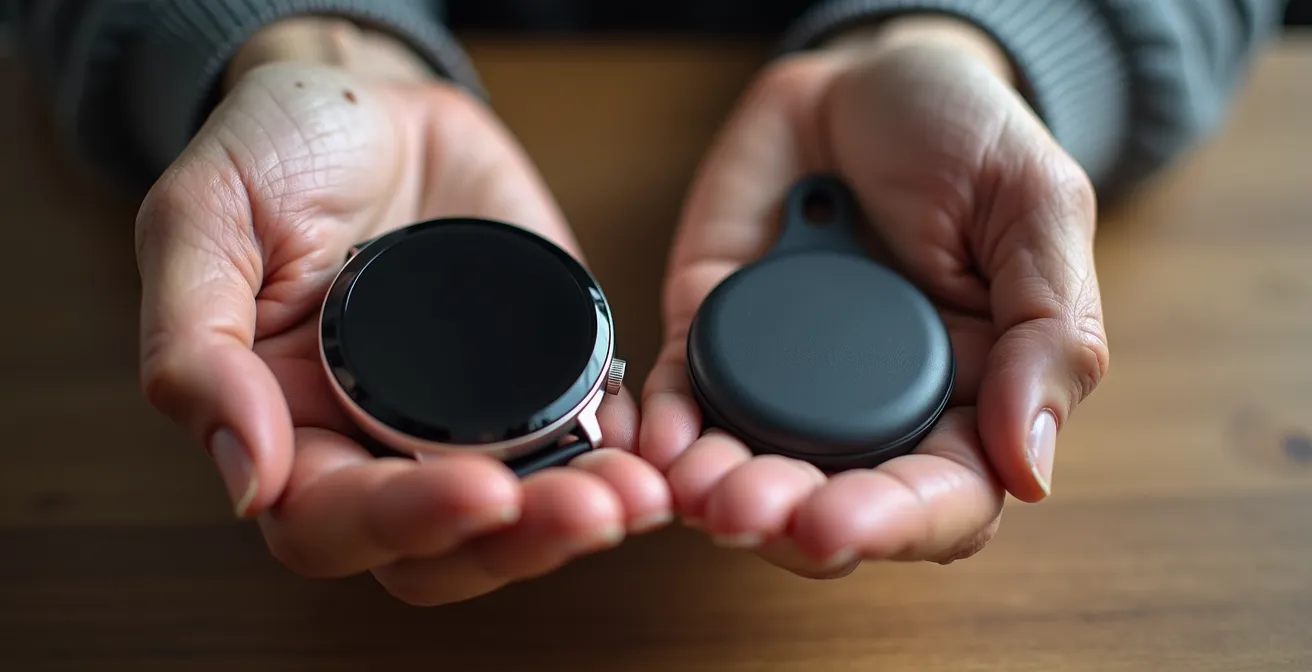
Medical-grade pendants or wearable patches, on the other hand, are designed for one purpose: high-fidelity physiological monitoring. They are typically FDA Class II medical devices, offering superior sensitivity and specificity for arrhythmia detection. Their major advantages include much longer battery life (often weeks, not hours) and the option for professional monitoring services that can directly contact emergency services. The tradeoff can be a more “medical” look and feel, fewer lifestyle features, and sometimes a subscription-based cost model. The following table breaks down the key differences to help guide your decision.
This choice is a critical first step, and understanding the nuances between these device types is key. As a comparative analysis from the American College of Cardiology highlights, both have distinct roles in modern cardiac care.
| Feature | Consumer Smartwatches | Medical-Grade Pendants |
|---|---|---|
| AFib Detection Accuracy | 84-98% PPV | 95-99% sensitivity |
| Continuous Monitoring | Yes (when worn) | Yes (24/7) |
| Battery Life | 18-48 hours | 7-30 days |
| Additional Features | Fall detection, activity tracking, medication reminders | Direct emergency response, professional monitoring |
| User Comfort | Familiar design, lightweight | May feel medical/stigmatizing |
| FDA Approval Status | Select models FDA-cleared for AFib | FDA Class II medical devices |
The Risk of Interpreting False Alarms and Causing Panic
With great data comes great responsibility. The single biggest risk in a remote monitoring ecosystem isn’t a missed alert; it’s a misinterpreted one that causes a wave of panic for both the parent and the child. A notification of an “irregular rhythm” can be terrifying if there isn’t a clear plan in place. It’s important to understand that no device is perfect. In fact, in younger, low-risk populations where the prevalence of AFib is low, some studies have shown that alerts can have up to a 45% false positive rate. While this rate is significantly lower in older, higher-risk adults, it underscores a critical point: an alert is not a diagnosis. It is a prompt to begin a calm, pre-agreed-upon process.
This is where you must build the rules for your ecosystem. Creating a “Proactive Triage” plan with your parent and their doctor is non-negotiable. This plan turns a moment of potential fear into a structured series of actions. As Dr. Usha Tedrow, a cardiac arrhythmia specialist, notes in the Harvard Heart Letter, “These findings really emphasize the importance of good communication with your cardiologist about the implications of detecting an afib episode on a smart watch.” This communication starts with having a clear protocol.
These findings really emphasize the importance of good communication with your cardiologist about the implications of detecting an afib episode on a smart watch.
– Dr. Usha Tedrow, Harvard Heart Letter
The plan should be simple, written down, and kept near where your parent spends most of their time. It defines the steps to take to verify the alert and determine the appropriate response, preventing an immediate rush to the emergency room unless specific, severe symptoms are present. The following checklist provides a template for creating your family’s action plan.
Your Pre-Agreed Alert Action Plan
- When an alert sounds, sit down immediately and take three slow, deep breaths to remain calm.
- Wait for 5 minutes in a relaxed state, then attempt to re-take the reading on the device.
- If the alert persists, use a secondary verification device, such as a blood pressure cuff with an arrhythmia detector or a simple pulse oximeter, to cross-verify the heart rate and rhythm.
- Document the time of the alert, the activity being performed just before it, and any symptoms felt (e.g., dizziness, shortness of breath, palpitations).
- Contact the designated family member (you) with these specific findings, not just with the news of the alert itself.
There should also be an explicit understanding: if an alert is accompanied by severe symptoms like chest pain, fainting, or extreme shortness of breath, all steps are skipped, and emergency services are contacted immediately. This two-tiered system provides both safety and sanity.
How to Share Data Automatically With Family Members?
A monitoring ecosystem is only as good as its communication channels. The data collected by the wearable needs to flow seamlessly and securely from your parent to you and any other designated family members. Thankfully, major tech platforms have recognized this need and built robust sharing features directly into their health applications. Setting this up is the technical backbone of your digital safety net, transforming raw data on your parent’s wrist into accessible insights on your phone, no matter where you are in the world.
The method for sharing varies slightly between platforms, but the principle is the same: one person (the parent) grants permission for another (the child) to view specific categories of their health data. This is a critical point for maintaining privacy and trust; your parent retains control and can choose to share only heart data while keeping other information private. For example, Apple’s Health Sharing allows for granular control, letting you see ECG PDFs and AFib history notifications, while Google’s Health Connect focuses more on trends over time. The key is to choose a platform and set it up correctly from the start.
The following table compares the sharing capabilities of the most common platforms, helping you understand the options based on the devices you and your parent use.
| Platform | Sharing Method | Data Types Shared | Setup Complexity |
|---|---|---|---|
| Apple Health Sharing | Health app family sharing | Heart rate, ECG PDFs, AFib history, activity | Simple (5 steps) |
| Google Fit/Health Connect | Account linking | Heart rate trends, activity, sleep | Moderate |
| Fitbit Family Account | Premium family plan | Heart rate, sleep, activity, wellness report | Simple |
| Samsung Health | Together feature | Steps, heart rate, exercise | Simple |
Beyond real-time alerts, establishing a “data-driven dialogue” is about reviewing trends together. Don’t just focus on the negatives. Set up a weekly automated health digest or schedule a brief weekly call to review the data. Celebrating a week of consistent activity or normal heart rate variability can be a powerful positive reinforcement, making the monitoring process a collaborative and encouraging experience rather than a source of anxiety.
Paper Tracking vs. Digital Apps: Which Is Better for Symptom Logging?
The quantitative data from a wearable—heart rate, AFib burden, activity level—is only half the story. The other half is the qualitative context: the symptoms. A high heart rate alert is just a number until it’s paired with a note like, “felt dizzy after walking up the stairs” or “heart was pounding after a stressful phone call.” This combination of what the device measures and what the person feels is what creates a true clinical narrative. The critical question is, what’s the best way for your parent to capture that vital context?
There is no single “best” method; the ideal choice depends on your parent’s comfort with technology and their personal preferences. The goal is to choose the path of least resistance to ensure the information gets logged consistently. For some, a simple paper notebook kept by their favorite chair is the most reliable tool. It requires no tech skills, never runs out of battery, and allows for rich, detailed notes. For others, a digital app on a smartphone or tablet is more efficient, as it automatically timestamps entries and can be shared with family or doctors with a single tap.

A third, often-overlooked option is using voice assistants. For a parent with arthritis or mobility issues, simply saying, “Hey Google, make a note that I’m feeling lightheaded at 2:15 PM” can be the most accessible method of all. A hybrid approach is often the most effective solution. A paper journal can be used for detailed, in-the-moment notes, while a digital app can be used to summarize key events for trend analysis and easy sharing. The following table compares the pros and cons of each method.
| Method | Best For | Pros | Cons |
|---|---|---|---|
| Paper Notebook | In-the-moment symptoms, qualitative notes | No tech skills needed, always available, detailed context | Can’t auto-correlate with device data, may forget |
| Digital Apps | Trend analysis, data sharing | Automatic timestamps, easy sharing, pattern detection | Requires smartphone skills, battery dependent |
| Voice Assistants | Hands-free logging, mobility issues | No writing/typing, natural language, immediate capture | Privacy concerns, requires setup, may misunderstand |
When to Install Sensors Before Dementia Progresses?
For families navigating the early stages of cognitive decline or dementia, the question of when to introduce monitoring technology is particularly delicate. It’s a balance between respecting autonomy and ensuring safety. The guiding principle should be to introduce technology in phases, tied to the observed needs related to Instrumental Activities of Daily Living (IADLs). IADLs are the complex skills needed to live independently—managing finances, medications, or transportation. When a specific IADL starts to become a challenge, that is the signal to introduce a piece of technology that specifically supports that task. This approach makes the technology a helpful tool, not an intrusive imposition.
For instance, AFib is a significant concern in this population; according to the CDC, approximately 9% of people 65 and older have AFib, and this risk can be compounded by cognitive challenges in managing health. Introducing a smartwatch with AFib detection can be framed as a tool for heart health management when you first notice occasional forgetfulness with medications. It’s a logical, supportive step. Later, if navigating familiar routes becomes confusing, you can enable the GPS location-sharing features on that same device.
The key is to have these conversations and get consent while cognitive function is high. Documenting their preferences for technology use in a healthcare directive or living will can provide clarity and peace of mind for everyone later on. A phased, needs-based timeline for technology introduction looks like this:
- When difficulty managing medications appears: Introduce basic pill reminder apps or a smart pill dispenser.
- When occasional navigation confusion occurs: Start with a GPS-enabled smartwatch for location tracking.
- When forgetting appointments becomes frequent: Implement shared calendar apps with audible voice reminders.
- When financial management becomes challenging: Add spending alerts from their bank and set up automated bill payments.
- When cooking safety concerns arise: Install smart home sensors for stove or smoke monitoring.
This gradual, respectful integration makes technology an ally in extending independence safely, building the health ecosystem piece by piece as the need arises, rather than all at once.
Key Takeaways
- A proactive health ecosystem, built around a wearable device, is more effective for remote care than reactive alert systems.
- Success hinges on collaborative adherence, addressing your parent’s comfort, confidence, and concerns rather than just enforcing device use.
- A pre-agreed action plan for alerts is non-negotiable to prevent panic and ensure a calm, structured response to data from the device.
How to Maximize a 15-Minute Telehealth Visit With a New Provider?
The ultimate purpose of your carefully constructed health ecosystem is to facilitate better medical care. All the data you’ve gathered—the heart rate trends, the AFib alerts, the symptom logs—culminates in the moments you and your parent have with a healthcare provider. With appointment times shrinking, a 15-minute telehealth visit can feel rushed and unproductive if you’re not prepared. This is where your system pays its biggest dividend. By preparing a concise, data-rich briefing, you can transform the visit from a simple Q&A into a highly efficient, collaborative consultation.
Providers are often overwhelmed with information. Handing them weeks of raw data is counterproductive. Your job, as the telehealth coordinator for your parent, is to distill this information into a powerful clinical narrative. As telehealth guidelines often state, context is what transforms raw data into a meaningful story a doctor can act on. You need to be the editor of your parent’s health story, presenting the headline, the key facts, and the primary question in a way that can be absorbed in minutes.
Context transforms raw data into a clinical narrative.
– Clinical guidance from telehealth protocols, Telehealth and Cardiology Guidelines
The most effective tool for this is a “One-Page Pre-Visit Briefing.” This simple document, sent to the provider’s office 48-72 hours before the appointment, is a game-changer. It gives the clinician time to review the most salient points, so they enter the virtual room already understanding the core issues. This allows the 15 minutes to be spent on diagnosis and planning, not on basic information gathering. The template is simple but powerful:
- Section 1 – Primary Goal (1 line): State the single most important outcome you need from the visit (e.g., “Determine if medication for AFib needs adjustment.”).
- Section 2 – Top 3 Questions (bullet points): List specific, answerable questions (e.g., “Is a 3% AFib burden concerning?” “What are the side effects of the new medication?”).
- Section 3 – Key Wearable Data (3-4 lines): Include AFib detection frequency, average resting heart rate, and one or two notable event timestamps with context (e.g., “High HR alert on Tuesday at 3 PM after physical exertion”).
- Section 4 – Recent Changes (2 lines): Note any medication changes, new or resolved symptoms, or significant lifestyle modifications since the last visit.
- Section 5 – Data Access Link: If possible, provide a secure link to the full health report from Apple Health, Google Fit, or a PDF export.
By taking on this role, you become an indispensable partner in your parent’s care, ensuring that every minute with their provider is maximized for their health and your peace of mind.
Building this remote health ecosystem is a journey that starts not with a purchase, but with a conversation. Talk to your parent about their health goals and how technology can be a partner in preserving their independence. By working together to choose the right tools, establish clear protocols, and prepare for medical consultations, you can transform the distance between you from a source of anxiety into a bridge of connection, supported by a digital safety net that watches over the heart of your family.